Cloudflare Access re-verification
A few scootRflix services sit behind Cloudflare Access before you even reach their own sign-in screen, to keep them off the public internet. Every so often — roughly every 30 days — Cloudflare asks you to prove it’s still really you on that device, even if you were verified before.
Why this happens
Cloudflare Access doesn’t trust a device forever just because it verified once. Re-checking periodically means that if a laptop or phone is lost, stolen, or simply stops being yours, access to these services doesn’t silently continue indefinitely. It’s a deliberate security choice, not a bug or a sign that something’s wrong.
What you’ll see
- You’ll land on a Cloudflare-branded page asking for an email address, before you even get to the service’s own sign-in screen.
- Enter the same email address you use for your Plex account. Cloudflare doesn’t check a password here — just that this email is on the approved list.
- Cloudflare emails a one-time code to that address.
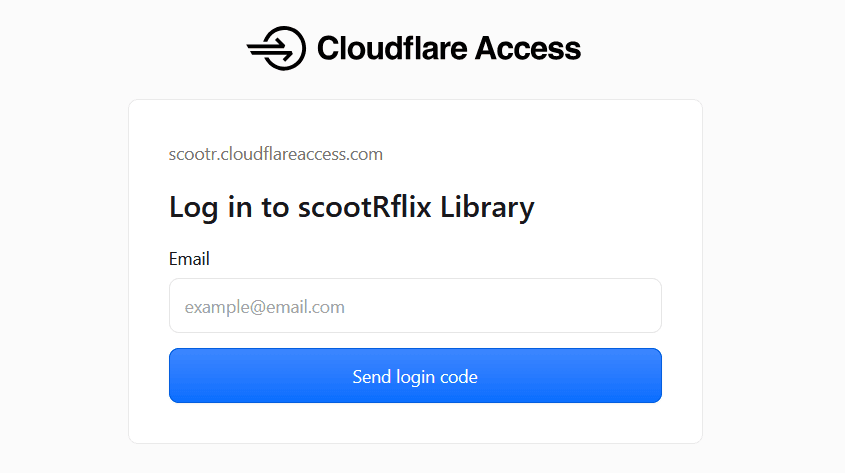
- Enter the code, and you’re through to the service’s normal sign-in screen (usually Sign in with Plex from there).
Don’t see the email? Check spam, and make sure you typed the exact address your Plex account uses — a typo here is the most common reason the code never arrives.
This isn’t a Plex or Authentik problem
This step happens before Plex sign-in, not instead of it — it’s Cloudflare protecting the front door, separate from the “Sign in with Plex” flow described in Signing in with Plex. Getting re-prompted doesn’t mean anything is broken with your account.
Still stuck after entering the right email and code? Check service status first, then ask in Discord.